T-mobile
T-Mobile's care reps were drowning in disconnected tools, opening 6 to 12 windows to solve a single customer problem. As the sole UX lead, I designed Grand Central: a unified troubleshooting platform that helped drive T-Mobile to #1 in J.D. Power customer care, earned a patent, and is now used for 95%+ of customer requests.
Shipped · Patented · Enterprise 0 → 1
Note : This case study is several years old, and the UI reflects the design conventions of that era. I'm including it because the problem of aligning multiple teams, tools, and workflows into a cohesive experience is still representative of the kind of complex product challenges I enjoy solving today.

The problem
A rep's screen was a landscape of disconnected tools.
To resolve one customer's issue, a care rep had to move across 6 to 12 separate windows, each a different system, none built around the actual workflow. They had to remember which tool solved which problem, open full applications for tiny tasks, and manually track which fixes they'd already tried. The cost compounded: longer training, longer calls, lower first-call resolution, and falling customer satisfaction. There was no shared record of what worked, so the system never learned.
Understanding the user
Too many tools, too little time
I was running focus groups on Grand Central, our care platform, when a rep said something that stuck with me. He wanted to see a customer's bill payment history before he started troubleshooting. That was puzzling at first. Grand Central was built to fix device and network issues, never to handle billing. Looking closer, it made complete sense. Reps were troubleshooting phones that weren't broken at all. The real problem was an unpaid bill, and the answer was sitting in a different system the rep wasn't looking at. The payment information existed. It just lived in another tool, one of as many as twelve a rep might touch in a day. With that much spread across that many places, the right detail was easy to miss, even when it was the thing that mattered most. That was the real issue. Reps weren't failing at their jobs. They were being asked to hold too much across too many tools, with no easy way to see the full picture of the person they were helping.

Set up of a customer care rep's desk

Set up of a customer care rep's desk
"There are many tools and functionality. Some times I can’t find what I need. May be I need to get additional training.”
In a rep's words
Customer care reps, under pressure to meet new requests or lower their call response time (CRT), tend to avoid trying to load a full tool just to access one piece of information or sometimes have doubts in the workflows even though they sit through a good amount of training already. More fundamentally, I realized that collaboration was weak between the different tools that has separate workflows and little shared responsibility, making the reps swtich back and forth across the many tools to accomplish a given task. The ownership of processes and information is fragmented and zealously guarded.

That is a lot of steps to remember, even if they did go through that in training. But the good thing is we know what was wrong:
The reps are navigating tools that are not built around workflows
They need to remember specific tools that solve a problem
There is a confusing landscape of disparate systems & applications (as many as 12 primary products, that has sub-tools, used in both Care & Retail)
At all times, a full tool is loaded to access a small piece of information
The aha moment
Empower, automate, self-evolve.
During the focus group sessions, the problem kept constantly circling back to –it is hard to find the right information in the multiple tools to complete a task at hand. The word “task” is what gave me the aha moment.

What if we took a Tasks First approach?
TBD
The vision
Iterating based on new findings
The core insight: reps don't think in tools, they think in tasks. So I broke the monolithic applications down into reusable building blocks and recomposed them around the actual workflow. A task became an orchestration of micro-apps, each drawing on the services it needed, assembled around what the rep was actually trying to do.
A task gives everything a rep would need, in one place. I realized that if these tools can be broken down to build MicroApps and MicroServices, their right orchestration can act as guidelines to finish a task.
This seemed to bring our disparate systems together surprisingly well, so much so that at our retrospectives, the recurring theme was that we all felt that we were “doing it right.”
I sat down with different teams to pinpoint what exactly we thought that we were “doing right” with the Tasks First approach to get their buy-in so that we could try to preserve that feeling even as our company grew and our capabilities expanded. We came to the realization that we all appreciated the different product teams were involved early on and now we can focus on building MicroServices/Micro-Apps collectively to support the Tasks First approach.
Here are the same example again, but with the Tasks First approach
A rep is taken through a clear set of actions. If you compare, some steps from the old model have become obsolete because these MicroApps hand off the outcome at each stage to the next.

Why it worked
The Tasks First approach is better hands down
It creates one access point for all the capabilities, selling/servicing techniques keeping the workflows in focus.
Gives exactly what’s needed
Business value: Gathering the MicroServices/ Micro Apps to finish a task in one place helps to save CRT (Call Response Time)

Learning by doing
Business value: Reduce training costs –Help the reps understand the logical flow, with clear steps to complete any task.

Reusable building blocks
Business value: Easy collaboration between different teams by creating MicroServices/ MicroApps from the tools they own.

The cherry on the top
Tasks are there when you need it
The reps need quick ways to find these tasks. A navigation menu is a classic but can't be enough.
Search
Reps can look at recent searches, resume any unfinished tasks.
Top results are provided based on what is being used often.
Widget results for some of the common queries to jump ahead in a task.

Customized Recommendation
Customized based on the rep type:
Tech Expert at a call center is more likely to tackle troubleshooting tasks.
Account Expert at a call center would want to see billing or rate plan related tasks.
Mobile Expert at a retail store would be interested in increasing sales.


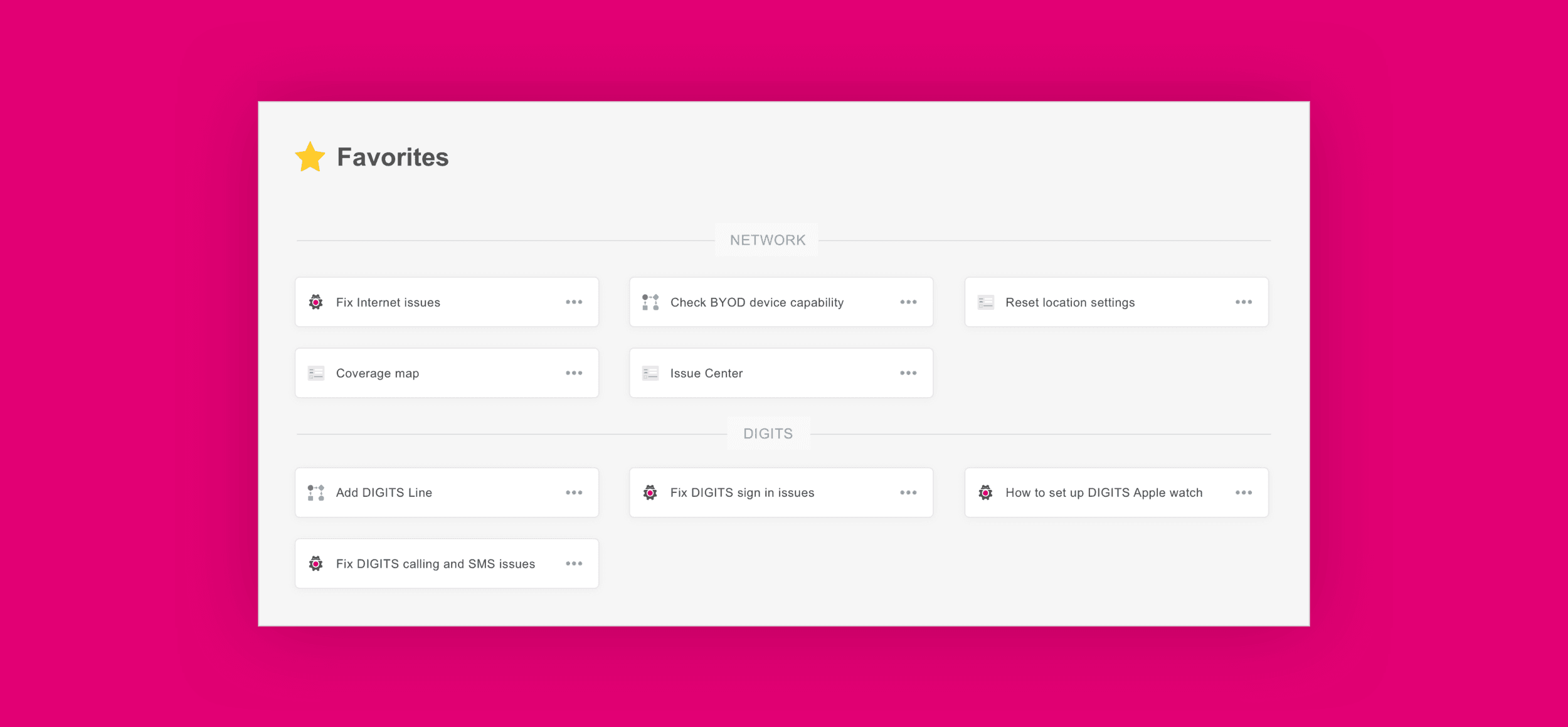
Favorites
Customized based on the rep type:
Tech Expert at a call center is more likely to tackle troubleshooting tasks.
Account Expert at a call center would want to see billing or rate plan related tasks.
Mobile Expert at a retail store would be interested in increasing sales.
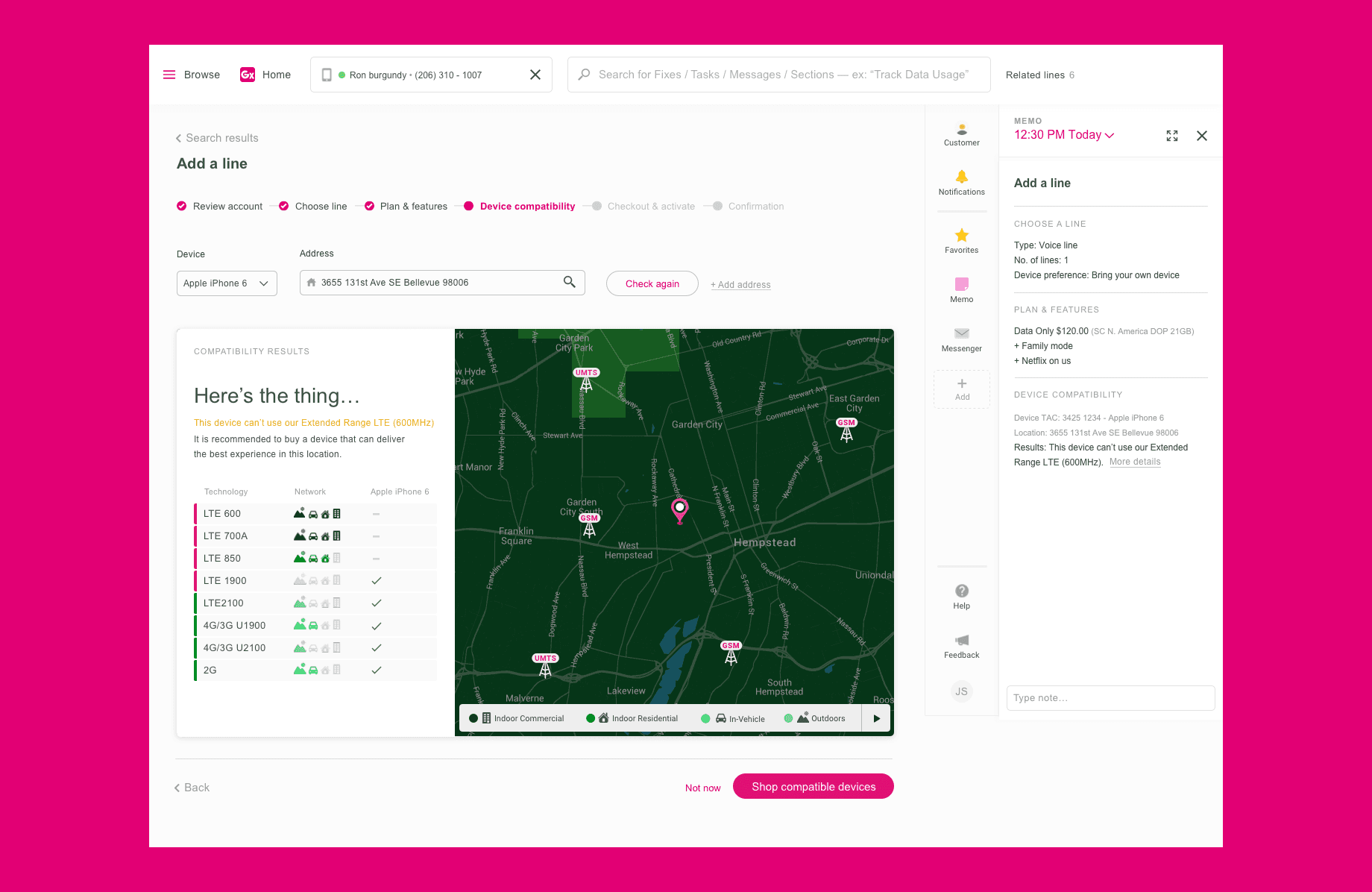
The solution
Fully reformed platform



Impact
The company reached the top of J.D. Power's customers care rankings
The studies collectively surveyed 15,668 customers who contacted their carrier’s customer care department for a time period of three months. The biggest contributor to these rankings was Grand Central, the most-loved product among the customer care reps. It is used for more than 95% of customer requests.
"Our incredible customer care teams just made history with their customer obsession. We’re primed to go totally next level!”
— Company's President and CEO (John Ledgere)

Some proprietary information has been modified for presentation purposes.
Reflection